Get ready for a wild ride of words and wackiness at the Spelling Extravaganza – it’s gonna be a spelling bee like no other!
We are putting on a Spelling Extravaganza on June 30. Please see EventBrite to learn more.
Looking forward to it!

Get ready for a wild ride of words and wackiness at the Spelling Extravaganza – it’s gonna be a spelling bee like no other!
We are putting on a Spelling Extravaganza on June 30. Please see EventBrite to learn more.
Looking forward to it!

This post chronicles the month-long adventure in getting one of our Dell OptiPlex 3020M (you know, the tiny one with no CD/DVD drive) desktops back in good working order.
First, the problem:
As we were still under warranty with Dell, I reach out to them. Here is what happened:

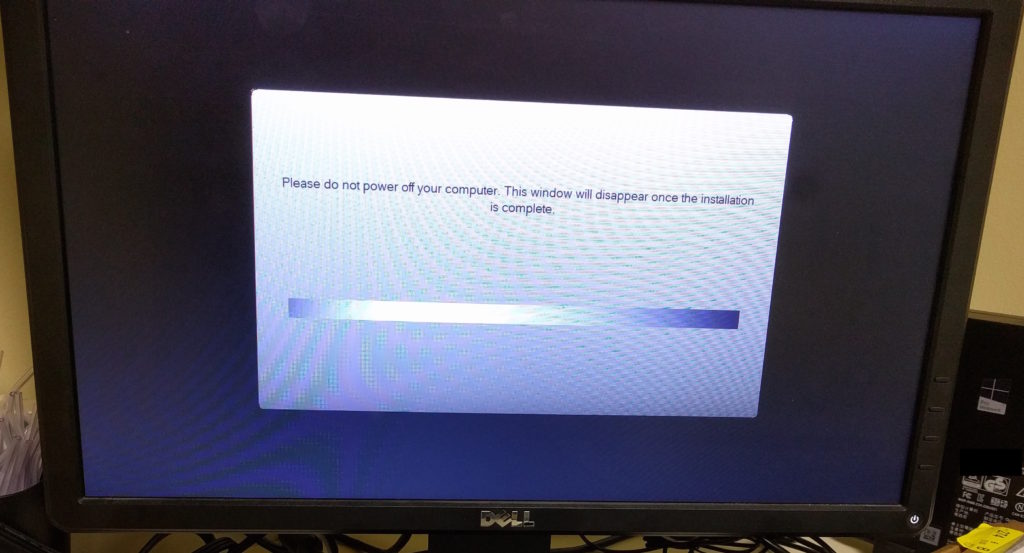
Dell OptiPlex 3020M stuck in gray on black loop of hell

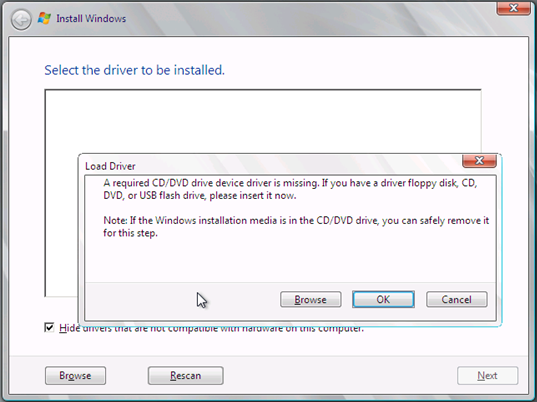
“A required CD DVD driver is missing” dialog
I wish the process wasn’t as difficult as it was. But at least I’m thankful that it works, and that my interactions with Dell Support helped me down the correct path, eventually. They were patient during the process, and had no problem sending their onsite tech to try to assist, which is the best I can hope for with business-level support.
Why does anyone think using the phrase “dead simple” is remotely acceptable?
Example:
DishwasherNow is the dead simple way to have a brand new dishwasher delivered to your door from iPhone.
Is “dead” an adjective for “simple”, which has morphed into a noun but has also ceased functioning in this world?
Or is this statement implying that the service is so easy to use that the walking dead can even order their dishwasher from the iPhone they are carrying in their lifeless hands?
Why can’t we just use “easy” or “simple”?
DishwasherNow is the easy way to have a brand new dishwasher delivered to your door.
See how much better that reads? You don’t have to be a rockstar engineer or ninja growth hacker to understand what this phrase means.
EDIT: I’m on the losing end of this battle (from Google Books Ngram Viewer):
Here at Mediafly, we are faced with hard engineering, product, sales and marketing problems every day. Each of us takes a different approach to solving these problems. Some of us like to create pros/cons lists. Others dig deep into data and use that help answer every question. No one approach is the “right” approach for everyone.
I recently had a conversation with our Engineering Manager[1], and he described his approach to solving hard problems.
I’ve watched him apply this method of problem solving over the years, and it truly is a thing of beauty. He will often take 2, 3, 4 attempts at particularly thorny engineering problems. He will sometimes throw away the code he wrote for an attempt and go back to the drawing board. He will restart this process from scratch as necessary. But, regardless, he almost always comes up with a solution that solves the problem elegantly. And watching his success has led me to begin adopting this approach for problems of all sort that I face as well.
[1] Special thanks to @laimis for being the inspiration for this method and this post! And he credits A Technique for Producing Ideas as inspiration for this process.
Related reading:

Discussions about design and UX for software these days so often focus on onboarding. Scott Belsky, founder of Behance, even suggests A good discipline to help you stay simple is to focus at least 50% of your effort on onboarding and the first-time-user-experience. Providing a great onboarding flow is the quickest way for your users to find value in your new feature. After all, the sooner a new user is able to find value, the more sticky it’ll be for them, and the less churn you’ll experience, right?
Makes sense, and it gives a great starting point for how to think about a new feature. For example, from Mediafly’s point of view:
Often, however, this is where the design of a feature stops.
When you’re working with enterprise organizations with large user counts, diverse business processes, very large data sets, or whatever key metrics you track, however, you need to consider the user experience when there is high volume of use in these key metrics.
Example 1.
From the beginning, we designed Mediafly’s content management system (CMS), Airship, to start as simply as possible. From day 1, users could drag in content from their laptop, with reasonable defaults, and immediately get value. As our customers adopted our CMS and scaled out their use across diverse business processes and groups, we continued to discover issues that we could never have foreseen at launch.
Recently, a large customer (a major CPG enterprise)began uploading merchandising layout diagrams, hierarchically organized by region, for each of their tens of thousands of their customers’ stores to our system. This dramatically increased two key metrics: their volume of content (tens of thousands of new documents) and frequency of updates (thousands of changes every week).
Automating the upload and management process on their end is a no-go, as there is no common backend system where these documents reside. And, asking people to update these layout diagrams with our Airship CMS would require 20-40 hours a week of navigating, clicking, and dragging/dropping.
To address this, we conceived of a new upload model in which an adminstrator of a one of their region’s merchandising layout diagrams could organize the new content hierarchically on their laptop, zip up the file, and upload it into our system. We would then interpret the results and update the content automatically in the correct location. This solution at once solves both the problem of content volume and update frequency. And it can be reused for other customers who encounter similar challenges.
We spend as much time solving user experience challenges of scale as we do thinking about how to build compelling new features whose adoption will begin at very low volumes.
Example 2.
We recently released the ability for our content administrators to create special links to view content, which has been a hit with our Media/Entertainment customers. The link can have a password, be tied to a user account, or be public. Creating a link is straightforward, and initial reception and usage of this feature started off as very positive.
But, after a few months, we began to hear feedback from content admins about some challenges they were feeling as their use cases for links expanded. The volume increased dramatically in some of these use cases. We now see that some admins have to create as many as 200 individual links for individual users in a single day, usually around television pilots or key screening seasons.
After diving deeper into some of these workflows, we created a process diagram to show what the typical process is to create a link. The content admin:
Whoa, that’s a lot of steps. Imagine having to go through this process 200 times in one day! For some admins, it requires the entire day.
We have since simplified the process to create a large number of links, and continue to improve upon the feature to solve the problem of high volume even further.
How these experiences have changed us
As we design new features, we now include an extra question to answer: What will this look like at high volume? At the design phase, we strive to have a hypothesis on how we would address problems of scale, and to see what we can do to simplify the initial UX even further should scale arrive faster than we can roll out a redesign.
However, just like most things we do from a product and engineering perspective, we operate iteratively. We certainly won’t prematurely optimize for scale. But by simply adding this question to our checklist of considerations, we’ve opened up the ability to solve the seemingly inevitable high volume issues that will arise.
(This post was cross-posted from the Mediafly Blog.)

(Cross-post from Mediafly and LinkedIn)
Here at Mediafly, we work hard to make the lives of salespeople better. We talk to a lot of salespeople, and what we hear from reps over and over again is “I hate my CRM.” This feeling comes from many reasons:
What does SalesKit Meeting Tracker do?
Once SalesKit Meeting Tracker has been turned on for your company’s environment, tap on the “Meetings” button and start tracking your meeting.

When you’re done, stop tracking, record the meeting’s details, and send them to Salesforce.com.

Your meeting’s details will appear within the Activity History for the account, contact, and opportunity you’ve chosen.

What’s coming next?
We have a rich roadmap for SalesKit Meeting Tracker, including integration to our other app platforms (web, Windows, Mac, Android) and to other CRM platforms (Microsoft Dynamics, SAP Cloud for Customer).

As is the case at many other startup/early growth phase companies, we at Mediafly haven’t hired a product manager. “Product management may be the one job that the organization would get along fine without”, and we’ve lived by that model for the past few years. Because of this, we operate lean and create our own best practices for the meaty parts of product management, most notably the product roadmap.
The product roadmap is necessary for any enterprise-focused SaaS company that is selling multi-year subscriptions to Global 2000 companies like we are. It’s used as a communication tool for:

An Example of Mediafly’s Product Roadmap
It can be easy to let the roadmap balloon into a complex, time-sucking monster. The roadmap itself is housed in Google Sheets, and broken up by product category (for us, those are SalesKit, ProReview, Airship CMS, Interactives, Reporting, andInfrastructure/Security). We organize specific entries in the roadmap into five columns, with the following definitions:

Sample Mediafly Details Document
Some entries in the product roadmap will be hyperlinked to a Details Document, which is hosted in Google Docs alongside the roadmap itself. These documents will vary in structure, but often contain:
Every 3-4 weeks, I will review the roadmap with our business leaders (currently, our CEO and EVP of Sales and Marketing). We focus on what’s changed since our last meeting and discuss new data that we’re seeing from clients, prospects, and the market. Then every 2 weeks, I will review the roadmap with the Product, Engineering and Customer Success teams. We focus on what’s coming up in the near future, and often will dive into the specific points to discuss better ways to solve specific problems.
Ad-hoc, I will be asked to present the roadmap to our customers. This is usually accompanied by a short presentation that explains what the roadmap is and how it works. Over the course of any week, I’ll spend about 1-2 hours reviewing and adjusting entries within the roadmap based on conversations, research, and incoming data.
We’ve managed to keep the product roadmap useful and relevant without too much overhead over the past few years by following this model. As we grow the entire Mediafly team through 2016 and beyond, this process will certainly evolve. I’m looking forward to that evolution, and will keep you up to date as it progresses.
If you’re involved in product management at your organization, please comment below with your best practices. I’d love to hear from you!
(Cross-posted on the Mfly Blog)
I found this through my LinkedIn feed today. While I’m not normally one for metaphors, this one is very apt.
This might be the source, but I’m not sure; Google searches list it appearing in a lot of places. If you know, please let me know!
UPDATE 4/23/2025: All is well. Continue turning off LLMNR.
UPDATE 4/15/2021: IMPORTANT! The latest Windows security update, KB5001330, is causing issues with Dentrix accessing the common folder on some computers. Dentrix released a notice yesterday stating that they found a workaround: turn Multicast Name Resolution (LLMNR) back on. While this might be fine for a temporary workaround, it’s a terrible long term solution because LLMNR is a known attack vector.
On Dentrix’s Facebook page, one participant indicated that another potential workaround is to set the Hosts file on each workstation to point the server to the server’s IP address. This should bypass all external name resolution, and bypass this issue altogether. We briefly tried this method (to solve a different problem) a few months ago, with terrible results, but it might be worth trying again.
The third potential workaround is to uninstall the Windows update and force your workstations to hold off on applying the update. And then, hope and pray that Dentrix will release a patch to address this problem the right way.
UPDATE 4/2019: we upgraded to G7, and everything is still speedy. This solution still holds, for us anyway.
UPDATE 4/22/2018: I had rebuilt two of our client machines (a front desk and an operatory computer), and the staff was complaining of Dentrix being extremely slow on these two. I remembered this post, followed the directions, and boom things are fast again.
P.S. Dear Dentrix Support, stop telling your clients to go upgrade all of their machines when they experience this issue. Please try this first.
ORIGINAL POST 6/20/2015:
The Dentrix G6 installation went relatively smoothly for the Belmont office of Forever Dental. After a few days, support came in and installed eCentral so we can file electronic claims. That’s when the problems started. Specific Dentrix modules (notably, Treatment Planner and Chart) were running extremely slowly. Treatment Planner would take upwards of five minutes to open a patient chart. This made no sense: it’s a small (but growing!) second practice, and there is no reason Treatment Planner should require so much time.
Programming note: If you need to convert Dentrix PDF reports to Excel, Google Sheets, or CSV, try Dentrix Report Converter. This is a simple service I’ve built to automate this. It is excellent for practice owners, office managers, accountants, attorneys, consultants, and anyone else who needs to quickly extract important information out of Dentrix. Dentrix holds your data hostage. Dentrix Report Converter unlocks it. Currently only $49.99 for 7 days of access, and your results are guaranteed. Thanks!
Our setup is relatively simple:
After 2.5 hours with Dentrix, they stumbled upon a solution: disable link-local multicast name resolution (LLMNR). My theory is that Hamachi adds so many subnets as the network grows, and unless you have static IP addresses mapped to names in the hosts file, LLMNR requires each request to a name to timeout before finally identifying the proper name-to-IP-address mapping.
Yes, it worked, but even as I wrote the above, it felt wrong. So if someone out there knows what is really going on, please leave a comment!
I was looking for a bike helmet for our 2-year old son, and pulled up “kids’ bike helmets” on Amazon.
Look at that first entry closely. Specifically, look at the upper bound on the price range.
Why would Amazon allow an upper bound price like that on such a simple item? Is it purely oversight, or is there some crazy psychological result that results in more sales when items are merchandised this way? Does anyone know?