I found this through my LinkedIn feed today. While I’m not normally one for metaphors, this one is very apt.
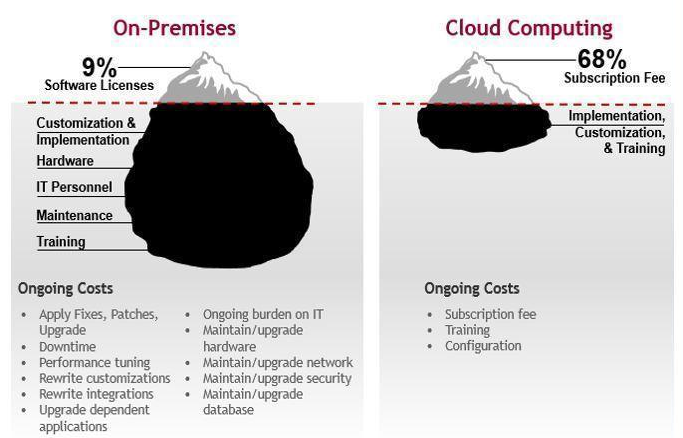
This might be the source, but I’m not sure; Google searches list it appearing in a lot of places. If you know, please let me know!

I found this through my LinkedIn feed today. While I’m not normally one for metaphors, this one is very apt.
This might be the source, but I’m not sure; Google searches list it appearing in a lot of places. If you know, please let me know!
UPDATE 4/23/2025: All is well. Continue turning off LLMNR.
UPDATE 4/15/2021: IMPORTANT! The latest Windows security update, KB5001330, is causing issues with Dentrix accessing the common folder on some computers. Dentrix released a notice yesterday stating that they found a workaround: turn Multicast Name Resolution (LLMNR) back on. While this might be fine for a temporary workaround, it’s a terrible long term solution because LLMNR is a known attack vector.
On Dentrix’s Facebook page, one participant indicated that another potential workaround is to set the Hosts file on each workstation to point the server to the server’s IP address. This should bypass all external name resolution, and bypass this issue altogether. We briefly tried this method (to solve a different problem) a few months ago, with terrible results, but it might be worth trying again.
The third potential workaround is to uninstall the Windows update and force your workstations to hold off on applying the update. And then, hope and pray that Dentrix will release a patch to address this problem the right way.
UPDATE 4/2019: we upgraded to G7, and everything is still speedy. This solution still holds, for us anyway.
UPDATE 4/22/2018: I had rebuilt two of our client machines (a front desk and an operatory computer), and the staff was complaining of Dentrix being extremely slow on these two. I remembered this post, followed the directions, and boom things are fast again.
P.S. Dear Dentrix Support, stop telling your clients to go upgrade all of their machines when they experience this issue. Please try this first.
ORIGINAL POST 6/20/2015:
The Dentrix G6 installation went relatively smoothly for the Belmont office of Forever Dental. After a few days, support came in and installed eCentral so we can file electronic claims. That’s when the problems started. Specific Dentrix modules (notably, Treatment Planner and Chart) were running extremely slowly. Treatment Planner would take upwards of five minutes to open a patient chart. This made no sense: it’s a small (but growing!) second practice, and there is no reason Treatment Planner should require so much time.
Programming note: If you need to convert Dentrix PDF reports to Excel, Google Sheets, or CSV, try Dentrix Report Converter. This is a simple service I’ve built to automate this. It is excellent for practice owners, office managers, accountants, attorneys, consultants, and anyone else who needs to quickly extract important information out of Dentrix. Dentrix holds your data hostage. Dentrix Report Converter unlocks it. Currently only $49.99 for 7 days of access, and your results are guaranteed. Thanks!
Our setup is relatively simple:
After 2.5 hours with Dentrix, they stumbled upon a solution: disable link-local multicast name resolution (LLMNR). My theory is that Hamachi adds so many subnets as the network grows, and unless you have static IP addresses mapped to names in the hosts file, LLMNR requires each request to a name to timeout before finally identifying the proper name-to-IP-address mapping.
Yes, it worked, but even as I wrote the above, it felt wrong. So if someone out there knows what is really going on, please leave a comment!
I was looking for a bike helmet for our 2-year old son, and pulled up “kids’ bike helmets” on Amazon.

Look at that first entry closely. Specifically, look at the upper bound on the price range.

Why would Amazon allow an upper bound price like that on such a simple item? Is it purely oversight, or is there some crazy psychological result that results in more sales when items are merchandised this way? Does anyone know?
I am creating a speedtest tool that is more reflective of reality for our customers.
To do this, I need to create a series of unique images that are approximately 1.5-2MB in size, as that is the average size of our HDS fragments.
Here is the Python script to generate a single image:
x = 300
y = 200

import png
import numpy
l = []
for i in range(0, y):
    l.append(random.randint(0,255,x * 3).tolist())

(png.from_array(l, "RGB")).save('image.png')
After this, tweak and repeat.
Here is what an individual image looks like:

(Cross-posted from the Mediafly Blog)
When I used to envision how small companies create a great strategy, I would often imagine a single or multiple leaders sitting down and writing out something to the effect of “here are the three things that we’ll do to win.” The picture in my mind is complete with a boardroom or conference room, men and women wearing business suits, and hours of PowerPoint presentations at the ready. My experiences at a management consulting firm reinforced this: oftentimes, decisions started as hypotheses by the most senior leaders, and were then justified back to them by consultants who gathered and made sense of data.
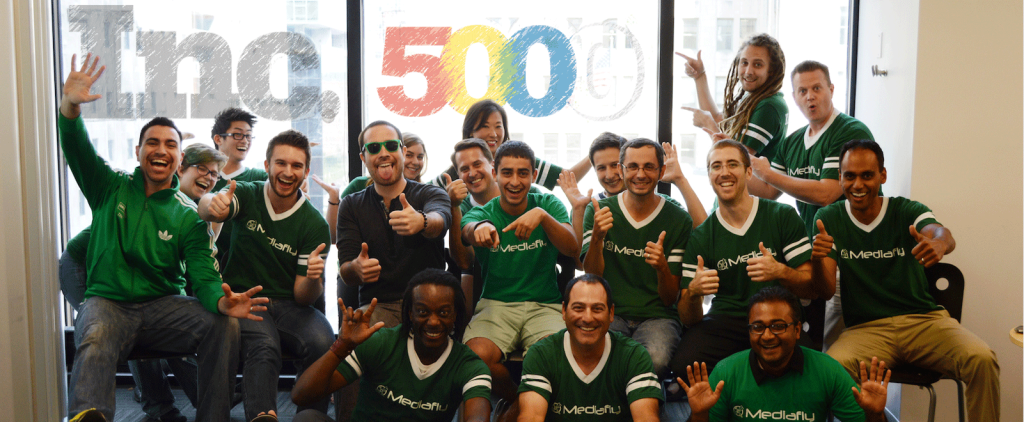
After growing Mediafly by 657% over the past three years (and that’s not even including 2014 or 2015 numbers), I’ve come to shift my mental picture of how strategy is built at small companies. The big conference room is replaced by a small one, often with people on the other end of GoToMeeting; suits are replaced by jeans; PowerPoint is replaced by conversation with a few bits of data thrown in; and the confidence of “here are the three things that we’ll do to win” is replace by “here are what we think might be good to try, based on a little bit of data, a lot of intuition, and a willingness to adjust as we learn.”
But the biggest surprise in my mental picture comes from how we develop strategy. Our strategy is highly influenced and often derived by our incredibly empowering culture and system of ad-hoc conversations.
At Mediafly, engineering, customer success, marketing, sales, and even interns have open, candid conversations with the executive team every day, passing along ideas and feedback in both directions. Customers can pick up the phone or write an email to anyone on the team, and expect to get help to solve issues. If team members find something they don’t like about any system, they are empowered to proactively fix it. Many team members work across divisional lines (engineering and marketing; sales and product; marketing and customer success), which empowers those team members to fix and grow even more.
As a result of the culture, our team members find themselves in ad-hoc conversations about all parts of the business every day. Conversations will form at each others’ desks, over lunch or drinks, on our messaging systems (GChat, HipChat), and of course by email. These all serve to align how each of us thinks about our company’s place in the world. All of this coalesces and informs our company’s strategy.
A couple of great examples of what I mean:
Our strategy focuses on “content mobility”. Previously, this meant mobile (and primarily iOS) apps. However, several inputs came together to help us broaden and redefine this this past year:
These inputs came in through our empowered team members thinking about their areas, via conversations at each others’ desks and at meals.
Assimilating these inputs was easy, when there were so many of them pointing in the same direction. As a result, we’ve begun to work on a desktop application and plan to release it within the next several months (stay tuned!).
We originally developed our Interactives Platform back in Q2 2012. At the time, we assumed Mediafly would build a consulting arm that caters to creating Interactives via consulting services to our enterprise customers, while our core team focuses on enterprise software licensing. We operated under this approach for almost a year, netting a reasonable amount of consulting work.
However, again, several inputs from our empowered team members, gathered via many conversations, helped reshape how we think about this:
We made the decision in 2013 to terminate all new Interactives development for our customers (with a few exceptions). The result has been amazing: better products, better focus, happier customers, and partners who are doing amazing work.
As we continue to serve more customers with our phenomenal products and services, we will strive to:
About a year ago, it became clear that Google Drive was attempting to focus on Docs, Sheets, and Slides as separate products. They launched separate apps for Docs, Sheets, and Slides on iOS and Android. It makes switching between a Doc and a Sheet more annoying. Maybe they are following the new trend in apps for a service to create a bunch of mini-apps (for example Foursquare’s recent split for the Swarm app).
But you know what’s really frustrating? Working with Google Docs/Sheets/Slides on the web. The service assumes that, because I am working on a spreadsheet now, the next document I work on MUST ALSO be a spreadsheet.

Here, I am working on a Sheet. But the next document I want to work on is a Doc. The only path out of this Sheet that I can see on the page is the giant green box next to the title of the Sheet. If I tap on that, I get sent to a list of other Sheets.
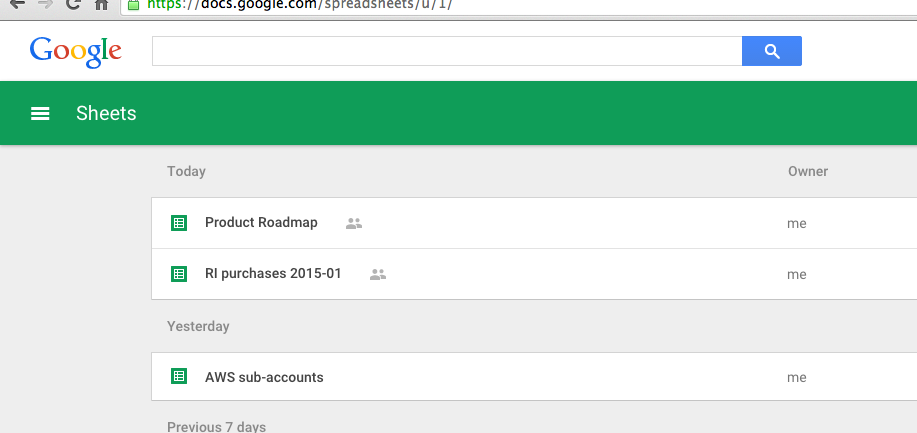
Why, Google, why? Why don’t you send me to your beautiful, robust Google Drive home? There, I can get a view of everything I’m working on.
Instead, I find myself:
If someone over in the Googleplex can hear me, please consider changing this default behavior to point back to Drive.
IDC announced today that worldwide tablet sales growth is expected to slow to 7.2%, and that iPad shipments will decline by 12.7%, the first year-over-year decline in the history of the product’s existence. This is significantly different from their 2013 report, which showed a year-over-year growth rate of 50.6%.
This announcement coincides with what I’ve been predicting for the past two years:from an enterprise perspective, tablets and laptops will largely consolidate to a single form factor.
The drivers are clear. Enterprise users want to be able to work effectively, regardless of what device their working on. They don’t want to carry around multiple devices and companies don’t want to supply or manage multiple devices. The iPad is a revolutionary device but it’s strengths still lie in content consumption, not content creation. Another limitation is the fact that users don’t want to have to have another upgrade path on tablets that is separate from their phones and their laptops. And on top of that, companies struggle to keep up with device upgrades.
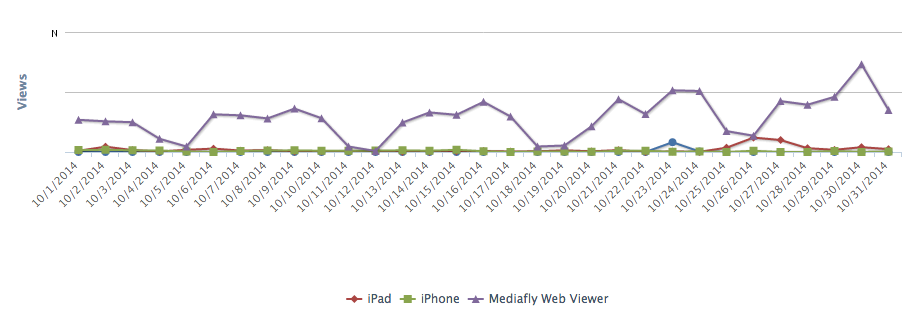
Despite prior years showing the significant growth of tablets as a device platform and Mediafly being a “mobile-first” enterprise software company, we’ve seen that our web viewer still ranks as the top platform. The device report below is from one of our enterprise customers and illustrates how important the browser is (represented by Mediafly Web Viewer).
We see a number of additional data points over and over that further justify this trend:
In anticipation of this shift, we are working on a new desktop solution that will work on multiple operating systems (Windows 7 and above, and Mac OS X 10.8 and above) and support all of our mobile app features including: full offline access, offline search, intelligent syncing, and Interactives. The desktop solution will remove the line between devices and will allow an end user to experience the benefit of our solutions everywhere.
Our target timeframe for launch is Q3 2015. We’ll keep you updated on our progress and share details along the way.
(Cross-posted on the Mfly Blog)
(Cross-posted to the Mediafly Blog)
A salesperson and client walk into a conference room. On the wall is a TV with Chromecast. The client switches the TV to Chromecast. The salesperson opens their Chromecast-enabled app, and instantly pairs with their tablet. The meeting starts, and the salesperson presents from their tablet. No wires, no fuss. It just works.
 People who run meetings and present are used to wires. HDMI and VGA, along with their adapters for their iPad or Mac. All to connect to a grainy, washed out, off-color projector. Wires have to be passed around between participants. Oftentimes the adapter is mistakenly left behind and needs to be repurchased.
Chromecast has the potential to change all this, and become THE replacement for cables in the conference room.
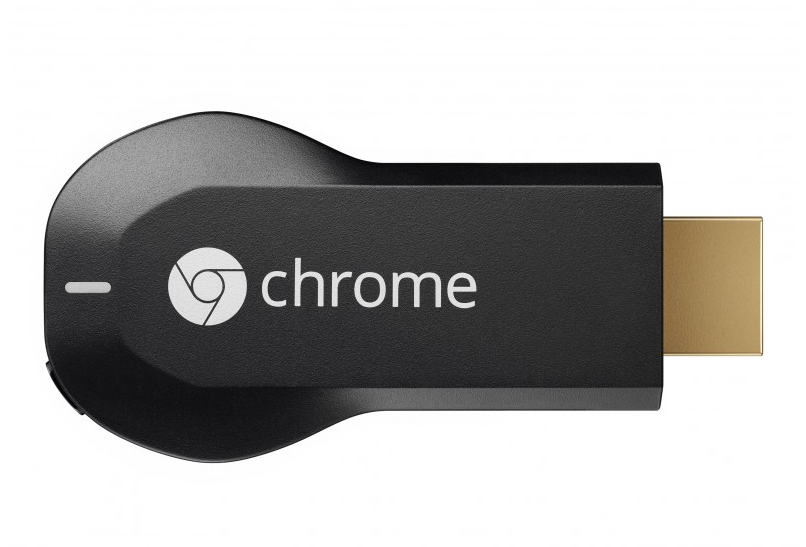
Chromecast is a $35, 3″ device made and sold by Google that simply plugs into an open HDMI port in your TV. It connects to your Wifi and is controlled by phones, tablets, and PCs. Most technologists think of Chromecast as the cheap HDMI dongle that lets people more easily stream Netflix and a limited, though growing, list of apps. Even with only a few interesting use cases available today, and even though it launched only halfway through 2013, Chromecast has already become the #1 selling connected TV device in 2013 in the US.
But to-date Chromecast is of limited use in the office. There are three main reasons:
1. Corporate networks require additional setup
The Chromecast setup phase is challenging for most corporate networks. Chromecast devices broadcast to a specific port to discover available Chromecasts, and they respond back to the broadcaster with “hey, I’m a Chromecast and look like this.” While this works really well on home networks, it breaks down on corporate networks. Cicso has a lengthy technical note dedicated to how to overcome this with their gear, and it summarizes into the following steps:
Without these steps, Chromecast cannot even complete the initial setup phase. And few IT admins will bother to go through these steps to allow the device to function on their network.
2. Guest usage is often impossible
For guests to use it (think: salespeople, customers), the corporate network a.) must allow guests, and b.) those guests must be on the same network as the Chromecast so they can discover the device. This leads to another series of challenges that IT admins would have to solve.
3. Business-focused Chromecast app support is limited
As a Chrome Mac user, I can cast (mirror) my desktop with some effort. But these are clunky if I simply want to present a deck I prepared. I want my presentation tool to natively support Chromecast.
First, lets start with challenge #2: Guest usage is often impossible.
Google announced last month that an upcoming update to Chromecast will help solve #2. With the update, Chromecast will use ultrasonic sound to determine if a user is in the same room as a Chromecast. Once that pairing happens, the user can control the Chromecast off their mobile/cellular or wifi network from their phone or tablet, just like that.
Next, challenge #3: Business-focused Chromecast app support is limited.
Google has a beachhead into this already. The Chromecast can cast any tab within Chrome, can cast the entire desktop (though this feature is experimental), and can natively cast Google Drive/Google Docs documents. Immediately, this can overcome the vast bulk of objections of using Chromecast, albeit not very smoothly. Google can solve this further by taking the following steps:
Making screen mirroring extremely fluid, possibly with desktop extensions that don’t require Chrome and are braindead simple
Directly asking/providing incentives for enterprise software companies to add support for Chromecast into their business apps.
This still leaves challenge #1: Corporate networks require additional setup as an issue for Google to address. It’s unclear whether Google has a strategy for this, or even cares to try to solve this problem. Historically, Google has not done a good job addressing enterprise needs in what they conceive as consumer products (see their awful support and limited enterprise-focused feature set in Android, as a case study). Moreover, it’s an incredibly hard problem to solve; enterprise networks are often very tightly locked down and often very different from each other.
In a later post, I will lay out where Chromecast sits relative to AppleTV and Roku, its closest competitors with respect to use in the enterprise.
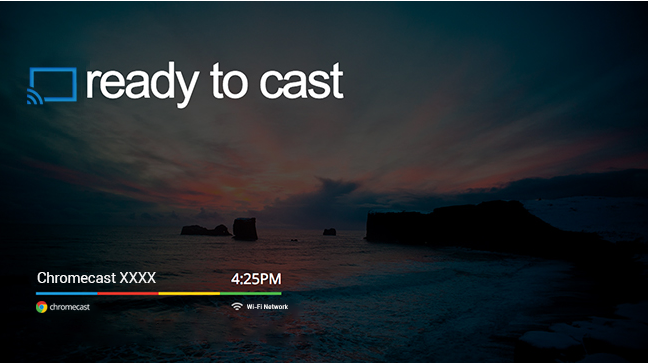
It will be interesting to watch how Chromecast evolves over the coming years, and potentially participate in its evolution. We are considering adding support for Chromecast into our products, and look forward to your feedback!
Since I wrestle with this about once per month, here is the IAM policy to allow full user access to an S3 bucket.
{
   "Statement":[
      {
         "Effect":"Allow",
         "Action":[
            "s3:ListAllMyBuckets"
         ],
         "Resource":"arn:aws:s3:::*"
      },
      {
         "Effect":"Allow",
         "Action":[
            "s3:ListBucket",
            "s3:GetBucketLocation"
         ],
         "Resource":"arn:aws:s3:::bucket-name"
      },
      {
         "Effect":"Allow",
         "Action":[
            "s3:PutObject",
            "s3:GetObject",
            "s3:DeleteObject"
         ],
         "Resource":"arn:aws:s3:::bucket-name/*"
      }
   ]
}
… this is ridiculous. This is only after four months.
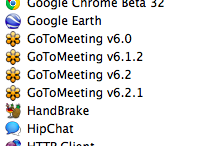
Can you please find a way to self-update your application?